
When publishing videos using the Media module, you can use the Embed on Web dialog to preview the video, copy a shareable URL, or copy the Iframe or JavaScript embed code to paste into your web page or application.
The dialog lets you select a Player, Player Sizing (Fixed or Responsive), and Aspect ratio. The Iframe and JavaScript tabs display the corresponding embed code. From the Player Management API perspective, the JavaScript player code is also referred to as the embed_in_page implementation.
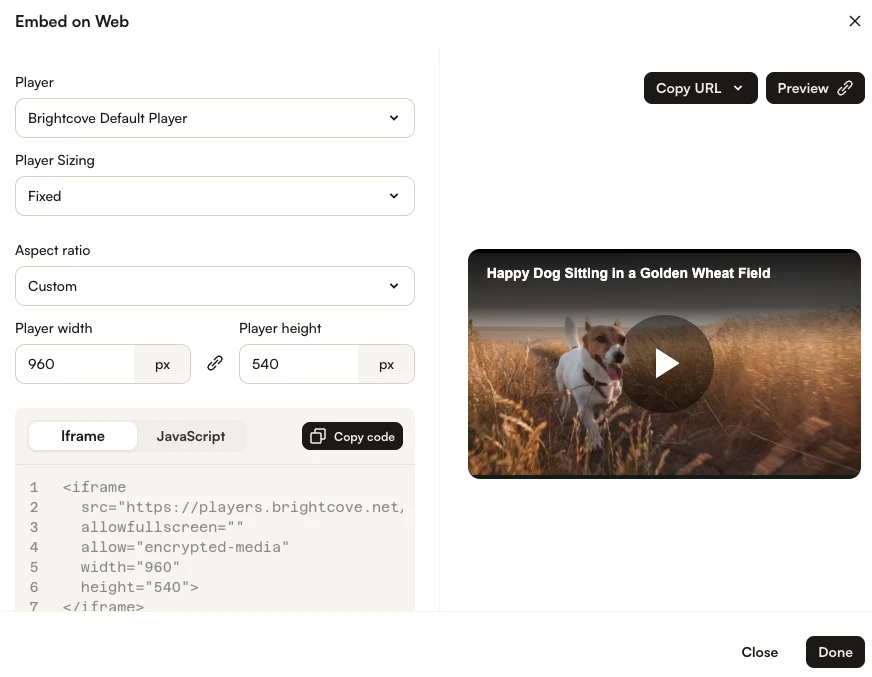
Iframe embed code
Typical iframe embed code will appear as follows:
<iframe src="https://players.brightcove.net/1507807800001/rf1BTdKk6M_default/index.html?videoId=6116779877001"
  allowfullscreen=""
  allow="encrypted-media"
  width="960" height="540"></iframe>
Some advantages of using the iframe embed code
- No collisions with existing JavaScript and/or CSS
- Automatically responsive
- The iframe eases use in social media apps or whenever the video will need to be used in an outside environment; for instance, Facebook will perceive the security threat is much less when the iframe is used versus putting the
<video>tag and associated JavaScript on their site (which Facebook does not allow)
JavaScript embed code
Typical in-page embed code will appear as follows:
<video-js data-account="1507807800001"
  data-player="rf1BTdKk6M"
  data-embed="default"
  controls=""
  data-video-id="6116779877001"
  data-playlist-id=""
  data-application-id=""
  width="960" height="540"></video-js>
<script src="https://players.brightcove.net/1507807800001/rf1BTdKk6M_default/index.min.js"></script>
Although integrating the JavaScript publishing code can be more complex, using the JavaScript code is best when the page containing the player needs to communicate with the player. Some examples of when to use the JavaScript embed code include:
- The code in the containing page needs to listen for and act on player events
- The player uses styles from the parent page
- The iframe code will cause application logic to fail, like a redirect from the parent page
Even if your final implementation does not use the iframe embed code, you can still use the JavaScript code with a plugin for your JavaScript and a separate file for your CSS. This encapsulates your logic so that you can easily use it in multiple players.
Recommendation
It is considered a best practice to use the Iframe implementation unless some application logic requires the use of the JavaScript embed code. If you are using the Audience module to track viewer engagement, the JavaScript embed code must be used.