
Introduction
Brightcove Metadata Optimizer
The Brightcove AI Metadata Optimizer automatically generates video metadata using text tracks, audio, and visual analysis. This helps ensure your content is discoverable, consistent, and aligned with your publishing standards.
You can access the Metadata Optimizer through three main entry points in the Video Cloud UI:
- During video upload
- In the Video Details page
- Via bulk selection in the Media module
Setting up the Metadata Optimizer
Enabling the Advanced Optimizer
By default, the standard optimizer uses a text track to suggest metadata. If the video does not have a text track, the standard optimizer generates one using auto captions.
The Advanced Optimizer analyzes both the audio and visual tracks to generate richer metadata. It does not require or generate a caption file; however, if an existing caption transcript is available, it is incorporated into the analysis.
To enable the Advanced Optimizer by default:
- In the Admin module, select Metadata Optimizer.
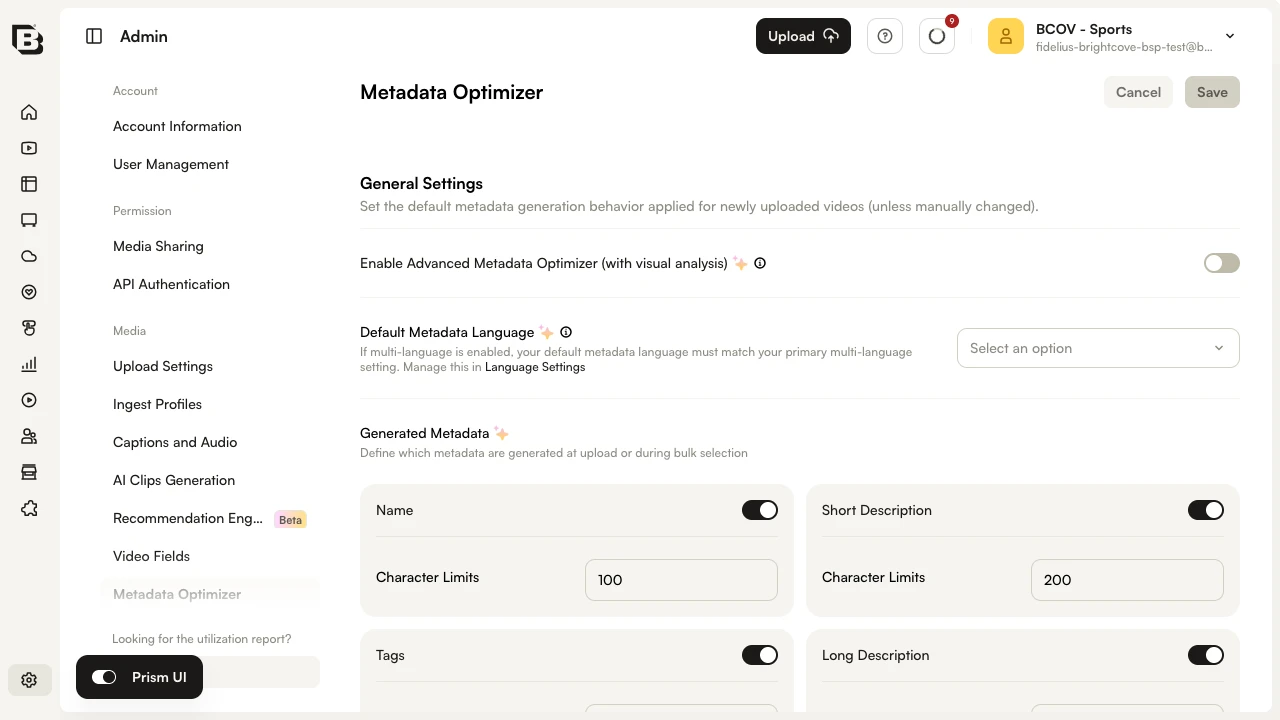
- Under General Settings, toggle Enable Advanced Metadata Optimizer (with visual analysis) on.
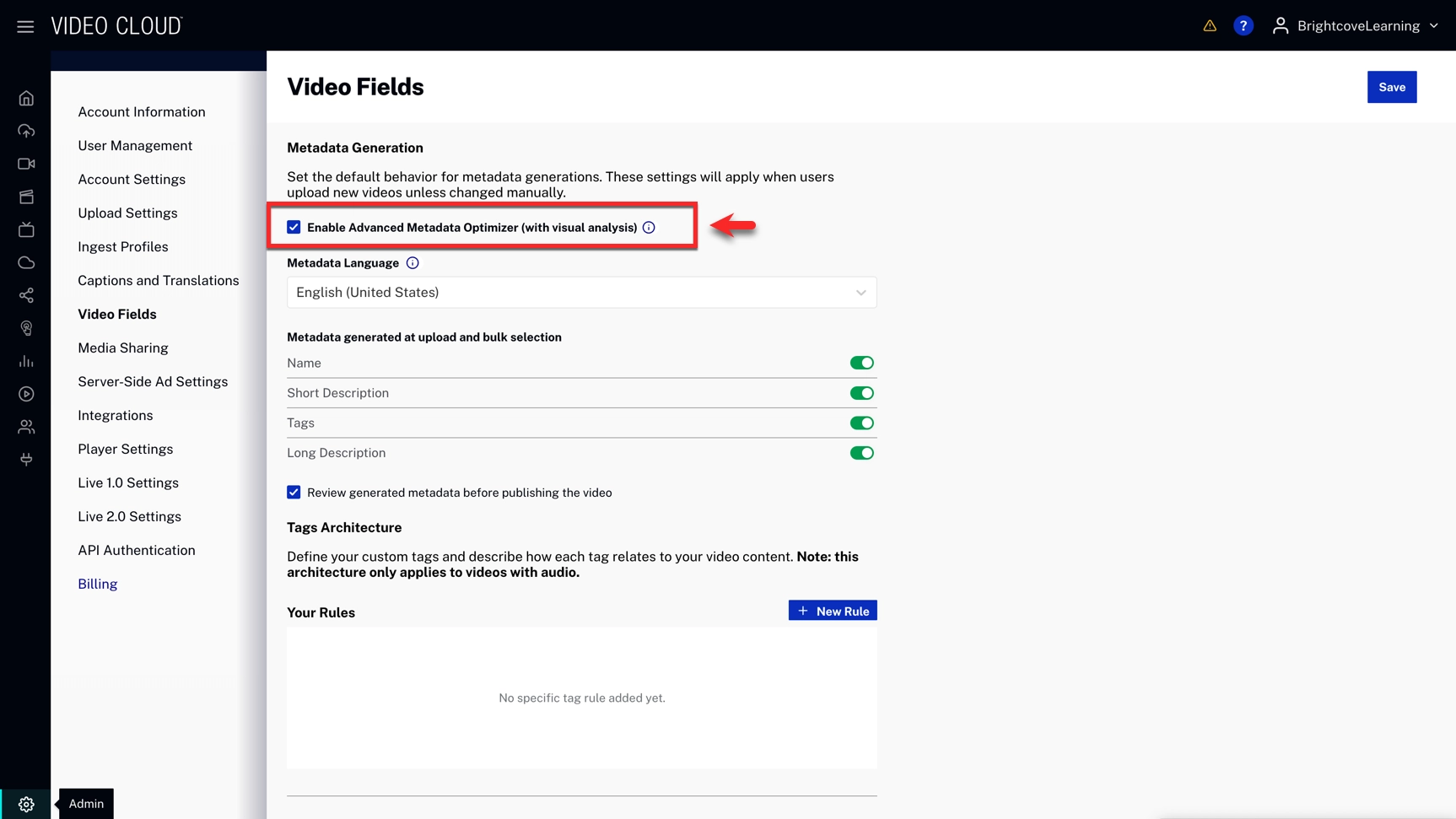
- Click Save.
Additional configurations on this page
Default Metadata Language
Under General Settings, use the Default Metadata Language dropdown to set the language used when metadata is generated. The default is English.
Generated Metadata
The Generated Metadata section defines which metadata fields the optimizer produces at upload or during bulk selection. Toggle each field on or off and set its Character Limits:
- Name
- Short Description
- Tags
- Long Description
Use the Review generated metadata before publishing the video checkbox to require approval before metadata is applied. When enabled, this becomes the default for all ingested videos and all bulk metadata optimizer calls.
Tag Rules
Under Rules & Optimization, click New to add custom Tag Rules. For each rule, define your tag and describe how it relates to your video content. Tag rules align generated metadata with your organization's taxonomy.
Reference Samples for Style Training
Provide up to ten Video IDs in the Reference Samples for Style Training section. The optimizer uses these high-quality examples to match formatting and tone in newly generated metadata.
Using the Metadata Optimizer
During Ingestion (Upload Module)
- Navigate to the Upload module and select Generate Metadata.
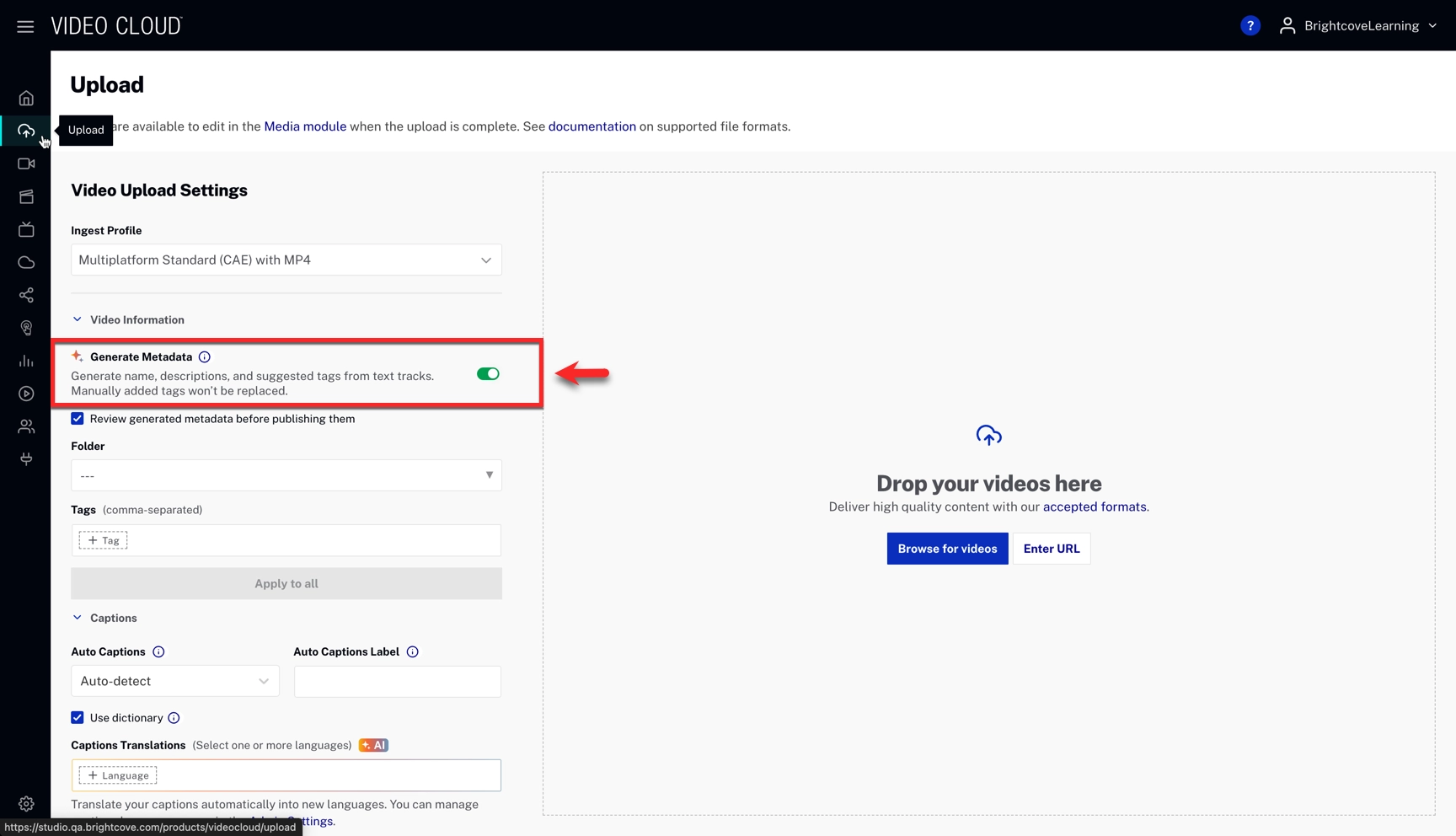
- (Optional) Select Review metadata before publishing if you want to approve suggestions first.
- Complete the upload. Metadata will be generated automatically.
If review is enabled:
- A yellow attention icon appears in your Media module (Status column) when metadata has been generated but requires review.
- View the video's detail page in the Media module, accept or request additional suggestions, then approve metadata for publication.
From the Video Details Page
- Navigate to the Media module and select a video.
- If the video does not have a text track, Auto Captions automatically generates one when you request metadata.
- In the Overview tab, click Generate Metadata.
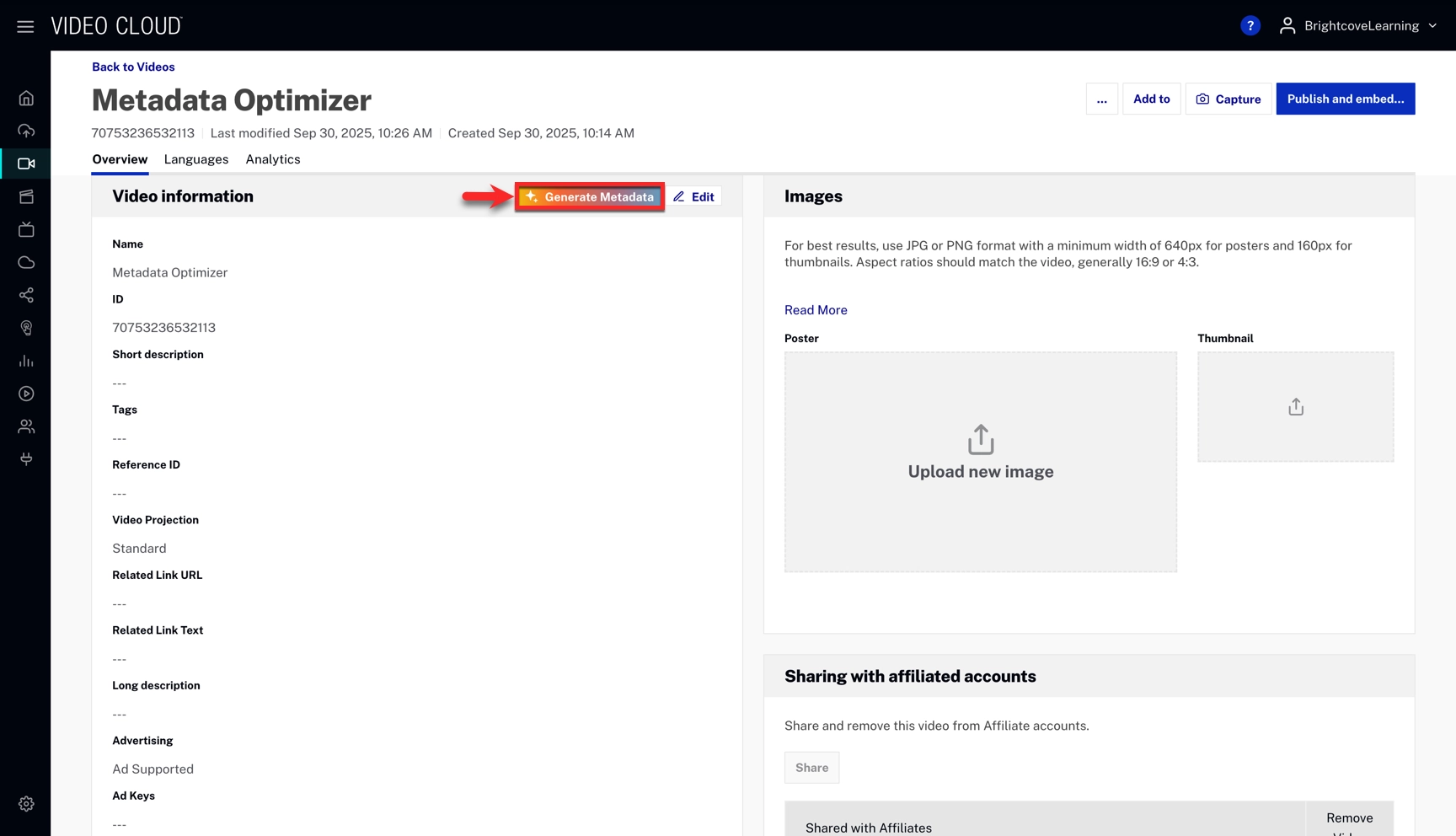
- Choose and edit metadata:
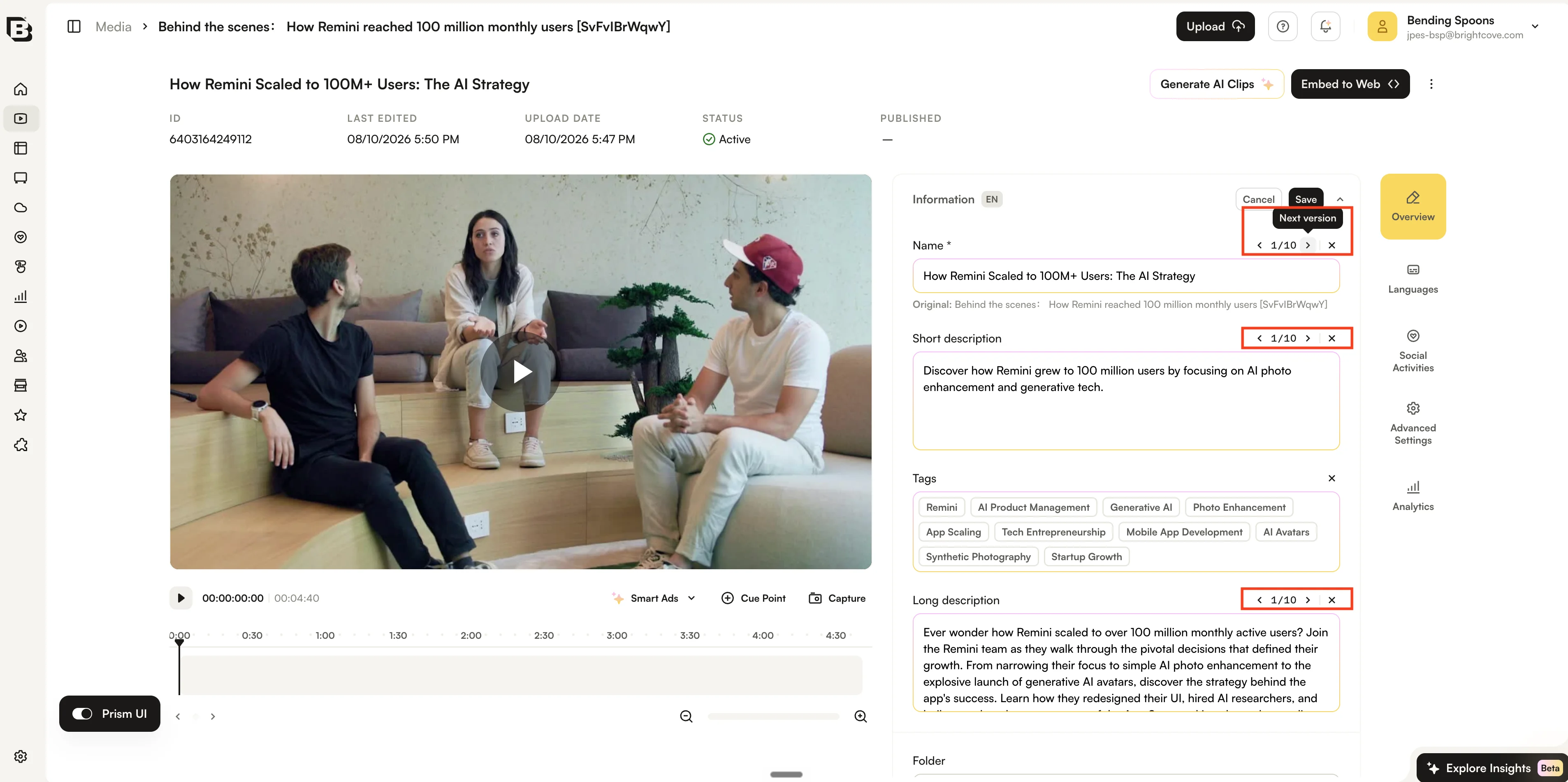
- For each text field, the optimizer generates ten suggestions. Use the arrows to move between them and select the version you prefer. You can edit the selected text manually if needed.
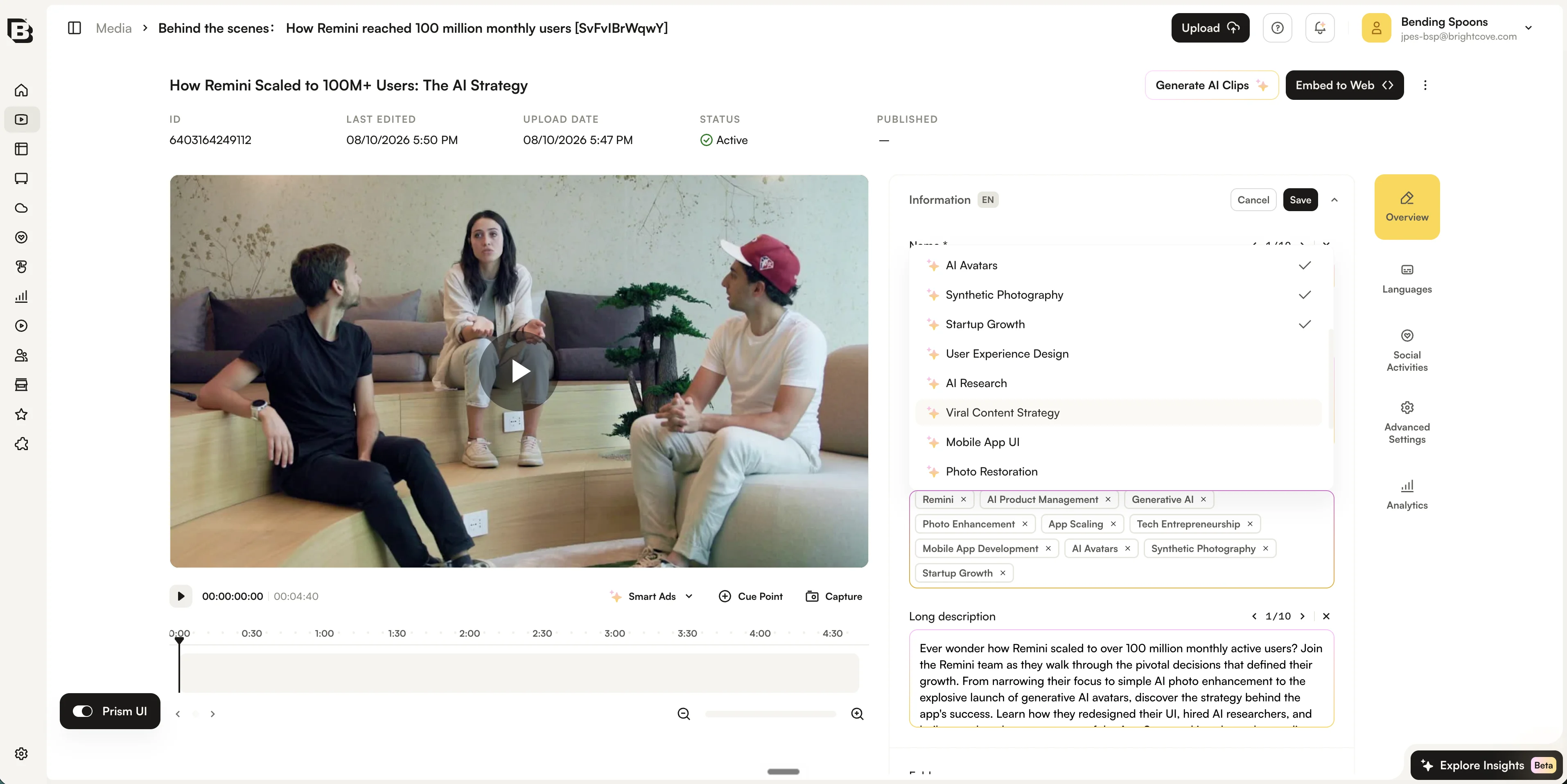
- For tags, the optimizer generates 20 suggestions, with ten initially selected. Click in the field to select which suggested tags to keep, remove suggestions, or add additional tags.
- Click Save to apply the selected metadata to the video.
Multi-Language Metadata
If multi-language metadata is enabled, you can set metadata in two ways:
Generate once, then translate
- Generate metadata in your main language.
- Save either for that single language or apply translations across all enabled languages.
Generate per language
- Change the Language View in Video Details.
- Click Generate Metadata and repeat the process for each language.
Bulk Metadata Generation
- In the Media module, select your videos.
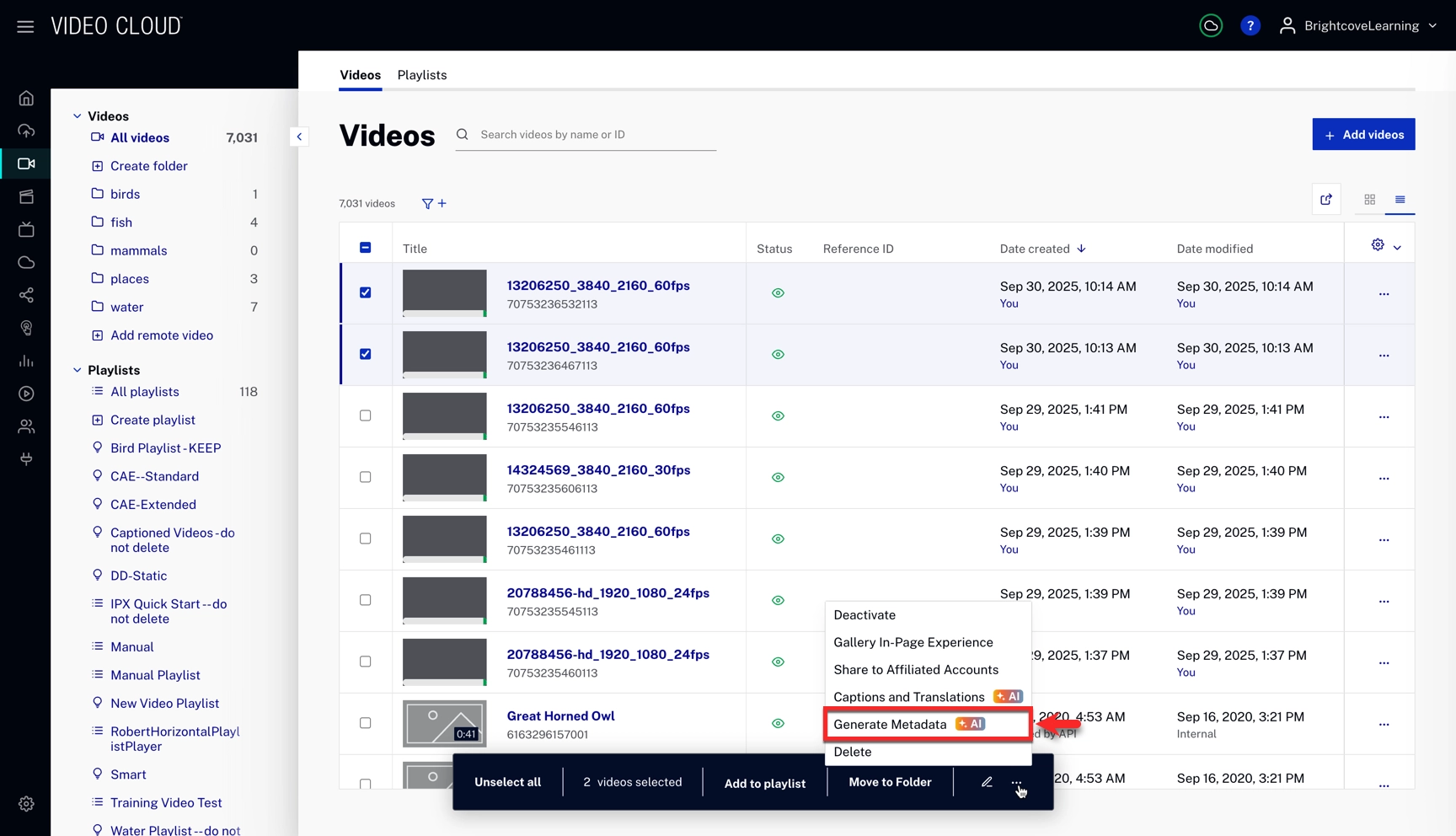
- Open the More actions menu in the bulk action bar and click Generate Metadata.
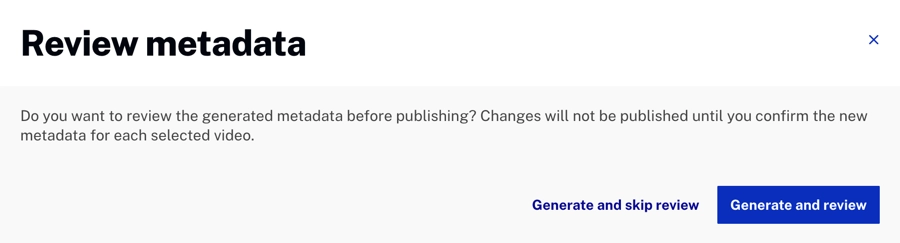
- In the Review metadata dialog, click Generate and review to require approval before publishing, or Generate and skip review to publish automatically.
If review is enabled:
- A yellow attention icon appears in your Media module (Status column) when metadata has been generated but requires review.
- View each video's detail page in the Media module. Accept or request additional suggestions.
- You can switch between generated text-field options and select, remove, or add tags in the same way as when generating metadata from a Video Details page.
Translating existing metadata
In the new Studio experience, you can translate metadata that is already on a video — for example fields you entered manually, imported, or saved earlier — from your account’s default metadata language into every other enabled metadata language in one action. This uses the same translatable text fields as when you translate freshly generated suggestions: Name, Short description, and Long description.
From the Video Details page
- Open the video in the Media module.
- Select the Overview tab.
- Confirm the metadata language view is your account default metadata language. If another language is selected, switch back before continuing — Translate Metadata is only available from the default language view.
- Click the metadata AI control (the control that also offers Generate Metadata), then choose Translate Metadata.
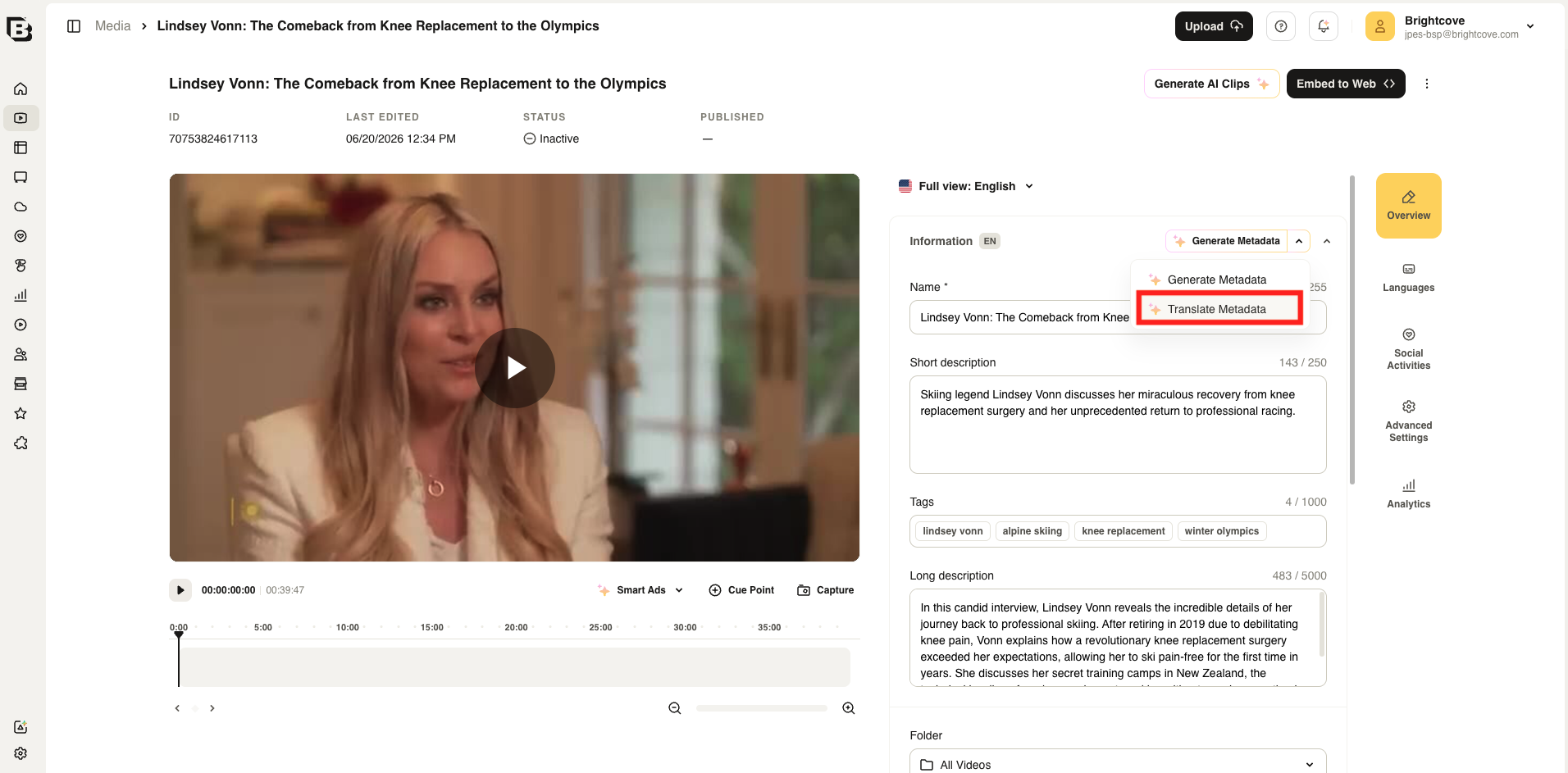
- The main Generate Metadata button switches to Translate Metadata; click Translate Metadata there to confirm.
From the Media module
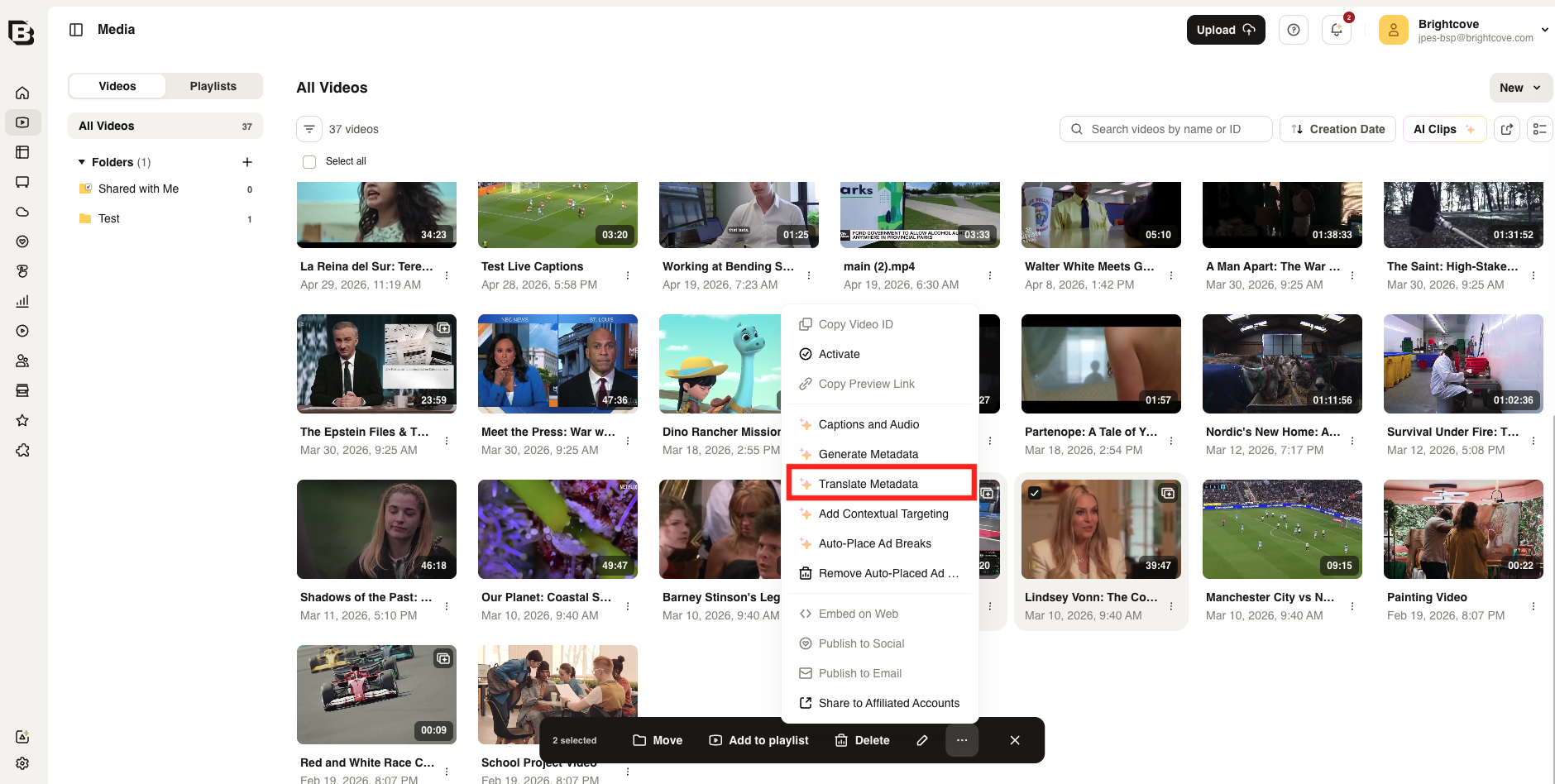
- In the Media module, select the video or videos whose metadata you want to translate.
- In the bulk action bar, open More actions (...).
- Choose Translate Metadata and confirm. Each selected video is updated using the same rules: source text from the default metadata language, translated into every other enabled metadata language.
API Access
Create/Fetch/Delete AI metadata enhancement job
Endpoint (requires scope video-cloud/video/read):
POST | GET | DELETE https://ingest.api.brightcove.com/v1/accounts/{account_id}/videos/{video_id}/ai/metadata-enhancement/{language}
POST payload fields
fields_to_generate: optional list of strings. Supported:names,long_descriptions,short_descriptions,tags. If empty/omitted, all four are generated.skip_review: optional boolean. If true, the first generated suggestion is automatically saved, possibly overwriting previous values. Suggested tags are added to existing tags. With multi-language enabled, skipping review always writes to the primary language view.auto_translate: optional boolean, forwarded to the workflow. It enables generating metadata and translating it into the enabled secondary language views in a single operation, and is used together withskip_review: true. This combined flow is supported through ingestion — see Request AI metadata enhancement at ingestion.use_tag_architecture: optional boolean. If true, user-defined custom tag rules are enforced (see/v1/accounts/{account_id}/ai/metadata-enhancement/tags).references: optional list of video IDs to use as inspiration for style.character_limits: optional mapping fromnames|long_descriptions|short_descriptions|tagsto number (max length).translation_request: optional object (for multi-language accounts) for translating metadata into non-primary language views. Providelanguages(required): an array of BCP-47 strings (e.g.["es-ES", "fr-FR"]). You can also optionally providename,short_description, and/orlong_descriptionto supply the source text to translate; when omitted, the video’s stored default-language values are used. Tags cannot be translated. Notes: whentranslation_requestis present, the job is translation-only —fields_to_generate,use_tag_architecture, andreferencesare ignored, onlycharacter_limitsis applied, and the job runs as ifskip_reviewweretrue. A single metadata-enhancement request cannot both generate and translate; to generate, apply, and translate in one operation, use the ingestionauto_translateflow described in Request AI metadata enhancement at ingestion.
GET response fields
Job objects match the metadata-enhancement job model (only fields that have a value are returned; optional fields may be omitted):
account_id: stringvideo_id: stringjob_id: stringlanguage: stringcreated_at: string (e.g.,2025-09-18)status: string (processing|finished|failed)error: optional string; present when the job failed or to describe an error (for example whenstatusisfailed)names: optional list of strings (suggestions or applied values when the job has produced them; typically whenstatusisfinished)short_descriptions: optional list of strings (same)long_descriptions: optional list of strings (same)tags: optional list of lists of strings, e.g.[["tag1", "tag2", …]](same)skip_review: optional boolean; when present, indicates the job was created with automatic apply (skip_reviewonPOST)from_ingestion_job: optional boolean; whentrue, the job was created from Dynamic Ingest (metadata_optimizeron a transcription request)
Get list of all AI metadata enhancement jobs
GET https://ingest.api.brightcove.com/v1/accounts/{account_id}/ai/metadata-enhancement/jobs
Scope: video-cloud/video/read
Response: list of job objects (same shape as the single-job GET)
Get/Update AI metadata enhancement tag rules
GET | PUT https://ingest.api.brightcove.com/v1/accounts/{account_id}/ai/metadata-enhancement/tags
Scopes, request, and response formats match the Autocaption Dictionary endpoint: /accounts/{account_id}/autocaption-dictionary
Request AI metadata enhancement at ingestion
In the ingestion API, new fields were added to the existing request:
POST /v1/accounts/{account_id}/videos/{video_id}/ingest-requests
{
  "transcriptions": [
    {
      "srclang": "en-US",
      "label": "English",
      "kind": "captions",
      "status": "published",
      "metadata_optimizer": {
        "language": "en-US",
        "fields_to_generate": ["names", "short_descriptions", "tags", "long_descriptions"],
        "skip_review": false
      }
    }
  ]
}
To generate metadata, apply it, and translate in one ingest job, use explicit srclang (not autodetect), set skip_review and auto_translate to true, and add translation_request with languages only — see Ingesting Transcript Files — AI metadata enhancement at ingest.
FAQs
- What are the limitations of this feature?
Standard optimizer uses text tracks only; The Advanced Optimizer also analyzes visuals. If a video lacks captions, you can auto-generate them (may require retranscoding). - Which languages are supported?
The Metadata Optimizer supports over 40 languages, including English (US, UK, AU, etc.), Spanish (Spain, US), French (FR, CA), German, Italian, Japanese, Korean, Chinese (Simplified & Traditional), and many more. - Can I prevent automatic publishing of metadata?
Yes. By enabling the review option, metadata will require approval before being applied. - Can I use the Universal Translator to generate text tracks for the Metadata Optimizer?
Yes. The Metadata Optimizer works with Brightcove Universal Translator, Brightcove Autocaptions, and third-party caption tools (standard formats). - Does it support third-party captions?
Yes, captions from outside Brightcove are supported. - Does clicking Regenerate to see more suggestions consume credits?
No. Credits are consumed only when you trigger metadata creation. Using Regenerate to fetch additional suggestions within the same session does not consume additional credits. - What can I translate with Translate Metadata?
You can use Translate Metadata for metadata that was produced by the Metadata Optimizer and for existing metadata (name, short description, and long description) that was entered or imported another way. Translate Metadata does not consume credits.